Here is a range of code snippets for GameMaker Studio 2.
PLEASE NOTE
!= is seen as …….

….in code views, – but it still copies and pastes as normal (!=)
—————————————————————————————
ALSO: ARE YOU FEELING BRAVE?
There is no Ligting engine in 2D games but:
If you want to add pseudo lighting
THERE IS A LINK to the tutorial HERE: link :Pseudo-Lighting
– BUT PRACTICE AT HOME FIRST !!!
CODE SNIPPETS:
Player CREATE
horiz_speed = 0;
vert_speed = 0;
my_grav = 0.3;
walk_speed = 8;

global.score=0;
Player STEP
key_left = keyboard_check(vk_left);
key_right = keyboard_check(vk_right);
key_jump = keyboard_check(vk_space);

//dirwection
var _horiz_movement = key_right - key_left;

horiz_speed = _horiz_movement * walk_speed;

vert_speed = vert_speed + my_grav;

//Jumping
//Add this code to jump - play with the vert_speed to make your jump correct:
if(place_meeting(x,y+1,obj_floor_wall)) && (key_jump)
{
	vert_speed = -11.7;
	audio_play_sound(snd_jump,10, false, 0.1, 0,2);

}

// ****** OPTIONAL //flip sprite base upon direction
// Flip sprite based on direction
if (_horiz_movement != 0) {
    image_xscale = sign(_horiz_movement);
}


//Check for predicted horizontal collisions:
if(place_meeting(x+horiz_speed,y,obj_floor_wall))
{
	//if going to hit a wall - move as close as possible first
	while(!place_meeting(x+sign(horiz_speed),y,obj_floor_wall))
	{
		x=x+sign(horiz_speed);
	}
	//stop now
	horiz_speed = 0;
}

//move Horixontal
x  = x + horiz_speed;

//Check for predicted vertical collisions:
if(place_meeting(x,y+vert_speed,obj_floor_wall))
{
	//if going to hit a wall - move as close as possible first
	while(!place_meeting(x,y+sign(vert_speed),obj_floor_wall))
	{
		y=y+sign(vert_speed);
	}
	//stop now
	vert_speed = 0;
}

//move Vertical
y  = y + vert_speed;

if(place_meeting(x,y+vert_speed,obj_door))
{


	if (room==Room1)
	{//Got to next room/level
		audio_play_sound(snd_levelup,10, false, 0.5, 0,2);

		room_goto(Room2);
		x=100;
		y=100;
	}
	else if(room=Room2)
	{//stop now
		audio_play_sound(snd_yay,10, false, 0.5, 0,2);
		show_message("The End");
		game_restart();
	}
} Non-Diagetic Sound (in new object laid on page) – IN CREATE
Non-diegetic sound refers to audio in film or theater that originates from outside the story world, meaning the characters cannot hear it, but the audience can.
audio_play_sound(snd_gamemusic,10, true, 0.1, 0,2);obj_coin – collision event with obj_player (Include Diegetic Sound)
audio_play_sound(snd_collectcoin,5,false, 0.1,0,2);
global.score +=1;

instance_destroy();obj_score – HUD display – In a controller DRAWGUI event
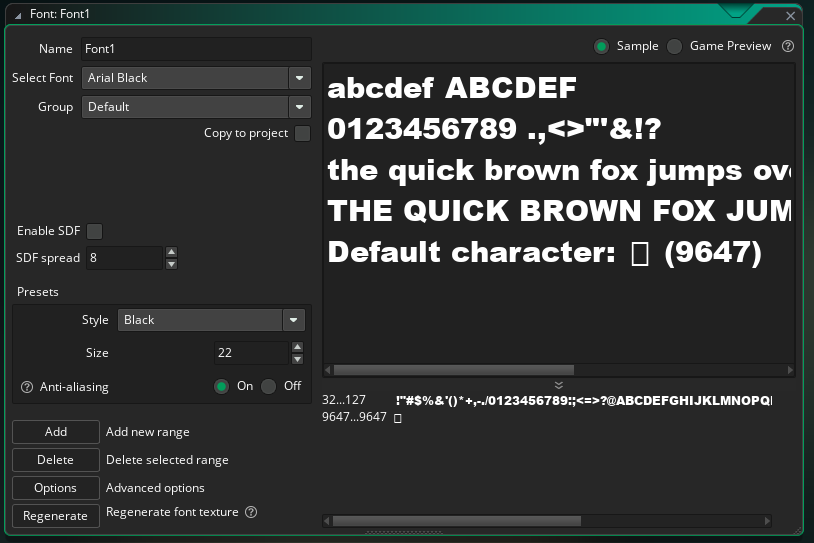
draw_set_font(Font1); //Create a font for ‘Font1’
draw_set_color(c_green); //standard GM2 colours
draw_text(70,20,"Lives: " + string(global.lives)); //If you have lives and a score you will need to change teh x/y numbers so they dont sit on top of each other
Handling Player lives:
IN PLAYER CREATE
global.lives = 3; //or however many lives you want to giveIN DRAWGUI in obj_score_controller (which you site in your page (make it persistent))
draw_set_font(Font1); //Create a font for ‘Font1’
draw_set_color(c_green); //standard GM2 colours
draw_text(70,20,"Lives: " + string(global.lives)); //If you have lives and a score you will need to change teh x/y numbers so they dont sit on top of each other
DEDUCT A LIFE WHEN SHOT ETC( IN THE COLLISION WITH THE PLAYER(obj_player) AND THE BULLET/ENEMY/OR KILLING OBJECT)
//Handle LIVES
global.lives -=1;  //deduct a life

if(global.lives <1)
{
	//end game show score - however you want to!
    show_message("You are dead");
	  game_restart();
}
FONT
Countdown Timer
CREATE
game_time = 60;          // 60 seconds
timer = game_time * room_speed; // convert to stepsSTEP
if (timer > 0)
{
    timer -= 1;
}

if (timer <= 0)
{
    // Game Over
    show_message("Time's Up!");
    game_restart();   // or room_goto(rm_gameover);
}DRAWGUI
var seconds = ceil(timer / room_speed);

draw_set_font(fnt_impact);
draw_set_color(c_white);
draw_text(20, 20, "Remaining Time: " + string(seconds));SHOOT BULLETS IN GAMEMAKER
OBJ_BULLET – most code in here
CREATE
speed = 12; // default speed
direction = 0; // will be set by play
STEP
// Destroy if outside room
if x < 0 || x > room_width || y < 0 || y > room_height {
    instance_destroy();
}
obj_enemy collide within OBJ_BULLET(as below) – hit by bullet
other.hp -= 10;
if other.hp <= 0 {
    instance_destroy(other); // destroy enemy
}
instance_destroy(); // destroy bullet
ALTERNATIVE CODE Code Snippets for rpgs – KB
//Code Snippet library for rpgs:

//Player create:

speed_walk = 3;

hp = 3;

keys = 0;

talk_range = 24;

text_show = false;

text_message = "";

text_timer = 0;


//Walk controls:

var h = keyboard_check(vk_right) - keyboard_check(vk_left);

var v = keyboard_check(vk_down) - keyboard_check(vk_up);


//Diagonal movement:

if (h != 0 || v != 0) {

var mag = point_distance(0,0,h,v);

h = h / mag;

v = v / mag;

}


//General movement and collision:

var nx = x + h * speed_walk;

if (!place_meeting(nx, y, obj_wall)) x = nx;


var ny = y + v * speed_walk;

if (!place_meeting(x, ny, obj_wall)) y = ny;


//Interact with npcs:

if (keyboard_check_pressed(ord("E"))) {

with (obj_npc) {

if (point_distance(other.x, other.y, x, y) <= other.talk_range) {

other.text_message = message;

other.text_show = true;

other.text_timer = room_speed * 4;

}

}

}


//Text timer:

if (text_timer > 0) {

text_timer -= 1;

if (text_timer <= 0) text_show = false;

}


//Player UI:

draw_set_halign(fa_left);

draw_set_valign(fa_top);

draw_text(16, 16, "HP: " + string(hp));

draw_text(16, 36, "Keys: " + string(keys));

draw_text(16, 56, "Level: " + string(room));


//Text boxes:

if (text_show) {

var w = 480;

var h = 40;

var x1 = 16, y1 = 88;

draw_set_alpha(0.7);

draw_set_color(c_black);

draw_rectangle(x1, y1, x1+w, y1+h, false);

draw_set_alpha(1);

draw_set_color(c_white);

draw_text(x1+8, y1+8, text_message);

}


//Using doors with keys (door event collide with player):

if (other.keys > 0) {

other.keys -= 1;

room_goto_next();

}

else {

other.text_message = "You need a key!";

other.text_show = true;

other.text_timer = room_speed * 2;

}


//Picking up keys or other items (key event collide with player):

other.keys += 1;

instance_destroy();


NPC variable= message (string)


Final goal (goal event collide with player):

show_message("you win or whatever");

game_end();


//Enemy create:

speed_walk = 1.2;


//Chase the player:

if (!instance_exists(obj_player)) exit;


var px = obj_player.x;

var py = obj_player.y;

var dirx = sign(px - x);

var diry = sign(py - y);


//Attack the player (enemy event collide with player):

with (other) {

hp -= 1;

if (hp <= 0) {

room_restart();

}

else {

x -= lengthdir_x(-100, point_direction(other.x, other.y, x, y));

y -= lengthdir_y(-100, point_direction(other.x, other.y, x, y));

}

} Make an object follow the mouse
Make sure your sprite for the object is origin: middle-centre
Add this code to the STEP event of the object that you want to actually follow the mouse:
x += (mouse_x - x) * 0.1;
y += (mouse_y - y) * 0.1;
If you want to use that mouse click to destroy a different instance of an object (ie: like a mole in Mole Attack or similar).
In the object you want to destroy:
- Open the object
- Go to Add Event → Mouse → Left Pressed
- Add this action or code:
instance_destroy();Interact key for an NPC (Test code to make sure it works properly): MC-S
// interact key
if (keyboard_check_pressed(ord("E"))) {
    // check NPC nearby (simple proximity check)
    with (obj_npc) {
        if (point_distance(other.x, other.y, x, y) <= other.talk_range) {
            other.text_message = message;
            other.text_show = true;
            other.text_timer = room_speed * 2; // show for ~2 seconds
        }
    }
}

//Restarting key when pressed R:

//Adding a restart key:
// restart key (useful while testing)
if (keyboard_check_pressed(ord("R"))) room_restart(); Default / Preferred Player Movement Parameters – JH
// Default / Preferred Player Movement Parameters
default_move_speed = 10
move_speed = 8; // the player's horizontal speed
max_move_speed = 12; // maximum speed the player can be
jump_speed = 12; // the players jump power
gravity_amt = 0.5; // the players gravity strength
hsp = 0; // horizontal speed / each step
vsp = 0; // vertical speed / each step var mx = keyboard_check(vk_right) - keyboard_check(vk_left);
hsp = mx * move_speed;
if (mx != 0) facing = sign(mx); // Jump (only if the player is standing on the correct object)
var on_ground = place_meeting(x, y + 1, obj_solid);
if (on_ground && keyboard_check_pressed(vk_space)) {
vsp = -jump_speed;
} // Applying gravity to the player
vsp += gravity_amt; // Players Horizontal collisions
if (place_meeting(x + hsp, y, obj_solid)) {
while (!place_meeting(x + sign(hsp), y, obj_solid)) x += sign(hsp);
hsp = 0;
}
x += hsp;
// Vertical Collisions use the same structure, replace x for y and adjust the
// Horizontal collision (swap x to y and hsp to vsp to make the vertical version)
// Move the movement value to the y-axis instead of x
// and the inside while() do the same with the + sign(hsp)// Drawing GUI
draw_set_font(fnt_defualt); // Font of choice
var txt = "Value: " + string(); // What the text will be
draw_text_transformed(25, 25, txt, 0.5, 0.5, 0); // Destroying the other object
instance_destroy(other); // Playing audio files
audio_play_sound(snd_music, 100, true); // Keyboard Inputs
if keyboard_check_pressed(ord("R")) {
} SIMPLE AI MOVEMENTS FOR ENEMIES ETC
//variables
duckdirection = 1;
count_of_moves = 0;

duck_total_move_max = 100;

duck_speed = 2;

//Ramdon duck movement
var number=irandom(8)
if (number>=5)
    {
        duck_speed = number;
    }
if (number<5)
{
  duckdirection = 0;
}


//Stay in room
x = clamp(x, 8, room_width - 8);
y = clamp(y, 8, room_height - 8);Basic Movement – KM
Setup
Create Event
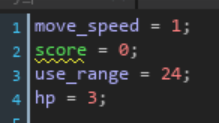
^ Basic Create event setup for the player object, these dictate the speed of movement, minimum distance from interaction objects and maximum hit-points.

^ Futher setup in the Create event for an instance layer interaction using lighting as well as tile collision.
Draw GUI Event
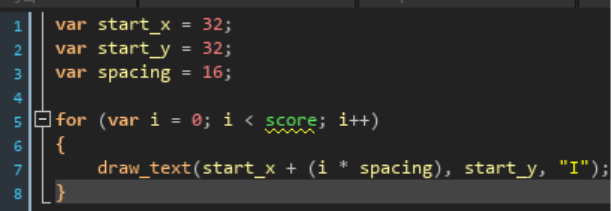
^ Drawing the score tally in a Draw GUI event in the player object.
Action
Step Event

^ Key binds for player position in GameMaker.

^ Player movement for both X and Y axis, and collision with a “wall”.

^ An addon used in movement functions to counteract “wall-sliding”, placed into the max_x_distance and max_y_distance.
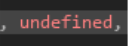
^ An undefined parameter used to get the default value in a function.
Sprite Animation
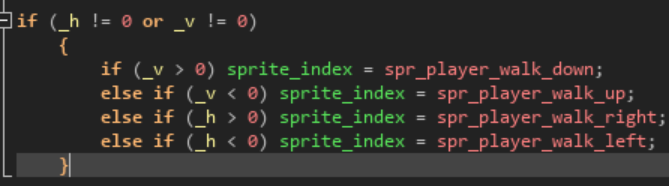
^ Parameters for the player sprite direction while walking.
^ Parameters for the player sprite direction while idle, must come after the walking direction parameters.
Enemies
Monster – Variable Definitions
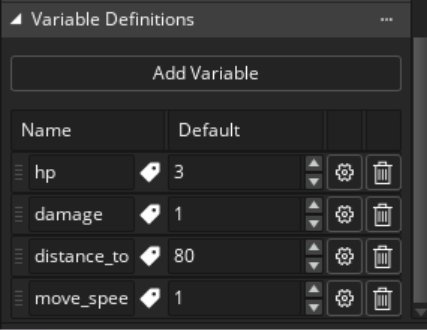
^ Variable definitions for the monster.
Monster – Create Event
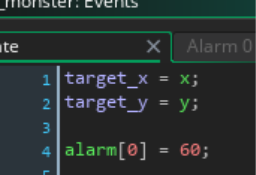
^ Create parameters for an enemy with a patrol and chase mechanic.
Monster – Step Event

^ Step event for enemy movement and collisions.
Monster – Alarm 0
^ Alarm event which decides the enemy’s patrol zone and distance from the player to start chasing.
Player – Collision Event -> obj_enemy
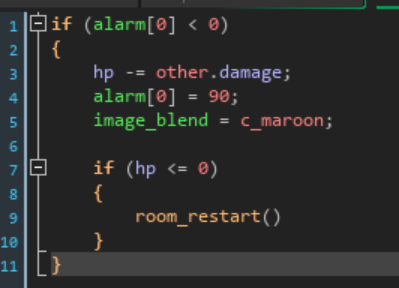
^ Player collision event with the enemy to receive damage, give a visual indicator to taking damage, and a grace period before the player can be hurt again.

^ An addition to the visual aspect of player damage, this function creates a visual damage indication in a separate instance layer beneath the player once hit.
Blood – Create Event

^ Create event in the visual object make the damage sprite random. This will also apply to any existing objects in the room.
Interactions
Player – Step Event
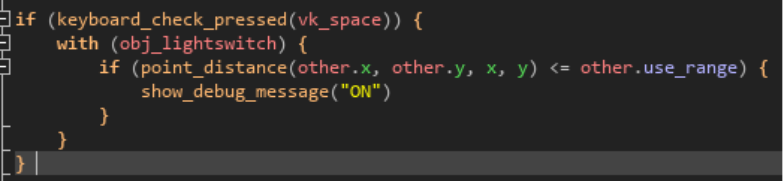
^ Interaction with an object of interest using Spacebar, requires existing parameters such as “use_range”.

^ Toggles visibility of a specified Instance layer using a state toggle inside of a switch, activated by the player within range and using a keybind.
Lightswitch – Create Event
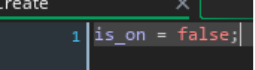
^ Must be setup in the switch’s Create event.
Player – Step Event
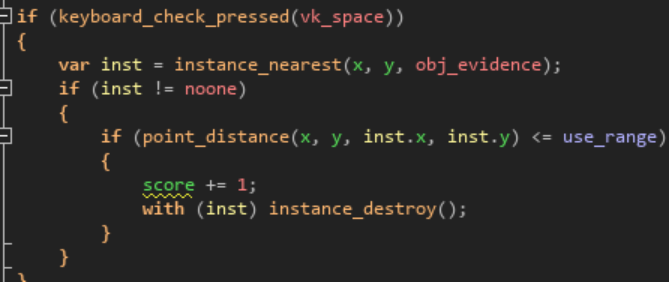
^ Interaction with a score object which will add to the player’s SCORE. The closest object to the player, within use_range will be activated and deleted.
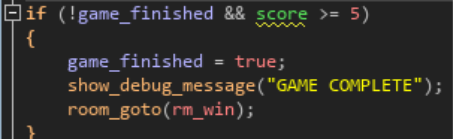
^ Win conditions in the player object Step Event. Minimum score required with an output log message and room transfer.
Controls
Player – Draw GUI Event
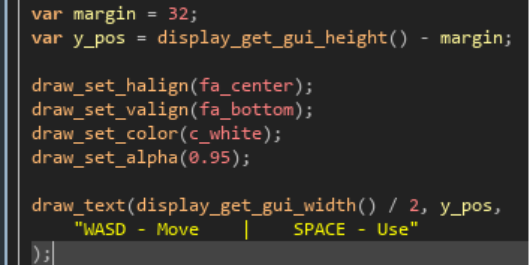
^ Addon to the player object’s Draw GUI, always shows on-screen controls to the player along the bottom of the screen.
MORE ENEMY MOVEMENT CODE
CREATE
speed = 2;
direction = 0; // moving right
left_limit = x - 100;
right_limit = x + 100;
STEP
// move enemy
x += lengthdir_x(speed, direction);

// flip direction when reaching bounds
if (x <= left_limit) direction = 0; // right
if (x >= right_limit) direction = 180; // left
PARRALAX BACKGROUND
//CREATE OBJ_CONTROLLER

//Create Event
// Parallax speed values
bg_speed = 0.5 ;
mid_speed = 0.12;
fg_speed = 1;

//STEP Event
// Get camera X position
var cam = view_camera[0];
var cam_x = camera_get_view_x(cam);

// Move layers at different speeds
layer_x("Background_Layer", -cam_x * bg_speed);
layer_x("Midground_Layer", -cam_x * mid_speed);
layer_x("Foreground_Layer", -cam_x * fg_speed);“tile horizontally” in each background sprite properties.
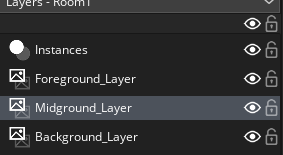
eg: midground set to offset in layer


- Flowers Foreground
- Mountains Midground
- Clouds Background
Here’s a simple GameMaker Studio 2 mobile virtual joystick + action button setup using GML.
obj_mobile_controls
Create an object called: obj_mobile_controls
Create EVENT:
//Create Event
// Joystick settings
joy_base_x = 140;
joy_base_y = display_get_gui_height() - 140;
joy_radius = 80;

joy_x = joy_base_x;
joy_y = joy_base_y;

joy_active = false;
joy_touch_id = -1;

move_x = 0;
move_y = 0;

// Action button settings
btn_x = display_get_gui_width() - 140;
btn_y = display_get_gui_height() - 140;
btn_radius = 70;

action_pressed = false;Step EVENT:
move_x = 0;
move_y = 0;
action_pressed = false;

// Check up to 5 mobile touches
for (var i = 0; i < 5; i++)
{
    var tx = device_mouse_x_to_gui(i);
    var ty = device_mouse_y_to_gui(i);
    var down = device_mouse_check_button(i, mb_left);

    if (down)
    {
        // Joystick side
        if (tx < display_get_gui_width() * 0.5)
        {
            joy_active = true;
            joy_touch_id = i;

            var dx = tx - joy_base_x;
            var dy = ty - joy_base_y;

            var dist = point_distance(0, 0, dx, dy);

            if (dist > joy_radius)
            {
                dx = dx / dist * joy_radius;
                dy = dy / dist * joy_radius;
            }

            joy_x = joy_base_x + dx;
            joy_y = joy_base_y + dy;

            move_x = dx / joy_radius;
            move_y = dy / joy_radius;
        }

        // Action button side
        if (point_distance(tx, ty, btn_x, btn_y) < btn_radius)
        {
            action_pressed = true;
        }
    }
}

// Reset joystick if not touched
if (!device_mouse_check_button(joy_touch_id, mb_left))
{
    joy_active = false;
    joy_touch_id = -1;
    joy_x = joy_base_x;
    joy_y = joy_base_y;
}Draw GUI Event
// Joystick base
draw_set_alpha(0.35);
draw_set_color(c_white);
draw_circle(joy_base_x, joy_base_y, joy_radius, false);

// Joystick stick
draw_set_alpha(0.65);
draw_circle(joy_x, joy_y, 35, false);

// Action button
draw_set_alpha(0.35);
draw_circle(btn_x, btn_y, btn_radius, false);

draw_set_alpha(1);
draw_set_color(c_white);
draw_text(btn_x - 12, btn_y - 12, "A");

// Reset draw settings
draw_set_alpha(1);
draw_set_color(c_white);Player movement example:
In your player object Step Event:
//In your player object Step Event:
var controls = instance_find(obj_mobile_controls, 0);

if (controls != noone)
{
    x += controls.move_x * 4;
    y += controls.move_y * 4;

    if (controls.action_pressed)
    {
        // jump, attack, interact, etc.
    }
}Cowboy – more difficult code section
//collide with small cactus

if (place_meeting(x, y + 1, obj_small_cactus))
{
    if (!hit_cactus)
    {
        global.score -= 1;
        hit_cactus = true;
    }
}
else
{
    // reset when no longer touching
    hit_cactus = false;
}///

//Colide with Spider
if (place_meeting(x, y + 1, obj_spider))
{
    if (!hit_spider)
    {
        global.score -= 1;
        hit_spider = true;
    }
}
else
{
    // reset when no longer touching
    hit_spider = false;
}

//obj_spider
//Create
vsp = 2; // vertical speed
hsp = 2; // horizontal speed

//Step
//Spider AI - chases the player
var dist = point_distance(x, y, obj_cowboy.x, obj_cowboy.y);

if (dist < 200) // detection range
{
    var dir = point_direction(x, y, obj_cowboy.x, obj_cowboy.y);

    hsp = lengthdir_x(2, dir);
    vsp = lengthdir_y(2, dir);
}
else
{
    hsp = 0;
    vsp = 0;
}

x += hsp;
y += vsp;